New CCAvenue Payment Gateway for WooCommerce
TechBella Payment Gateway Pro (CCAvenue UAE + India)
Accept CCAvenue payments in WooCommerce for India and the UAE. Redirect and iFrame checkout, sandbox mode and automatic order sync.
5.0 Customer rating- India and UAE
- Blocks checkout
- Sandbox mode
- HPOS ready
Independent plugin by TechBella · Compatible with CCAvenue

Why upgrade to Pro
CCAvenue UAE Plugin for Dubai and Middle East Stores
The free plugin covers the India region. Pro adds the CCAvenue UAE region, so your WooCommerce store can take payments through your own CCAvenue UAE merchant account. Choose the region in the gateway settings and keep the same checkout.
- India and UAE regions in one plugin
- Works with the WooCommerce Blocks checkout
- Plugin updates while your license is active
-
1Install Install the plugin and activate your Pro license.
-
2Connect Enter your Merchant ID, Access Code and Working Key.
-
3Choose region Pick India or UAE, then test in sandbox mode before going live.
Your own CCAvenue merchant account is required.
Who it is for
- Dubai and UAE online stores
- Indian WooCommerce stores
- Stores on the Blocks checkout
- Agency client sites
- Freelance projects
The UAE region needs an active Pro license and your own CCAvenue UAE merchant account. The plugin cannot create or approve a merchant account, so please confirm with CCAvenue in writing that your business is eligible before you buy.
Features
Powerful Features of the CCAvenue Payment Gateway for WooCommerce
The India and UAE regions and every tool you need to run CCAvenue payments from WooCommerce. Cards marked Pro need a Pro license.
UAE Region
Accept payments through CCAvenue UAE for Dubai and Middle East stores.
WooCommerce Blocks
Works with the newer WooCommerce Blocks checkout.
Pro Updates
Updates keep the plugin compatible with new WooCommerce releases.
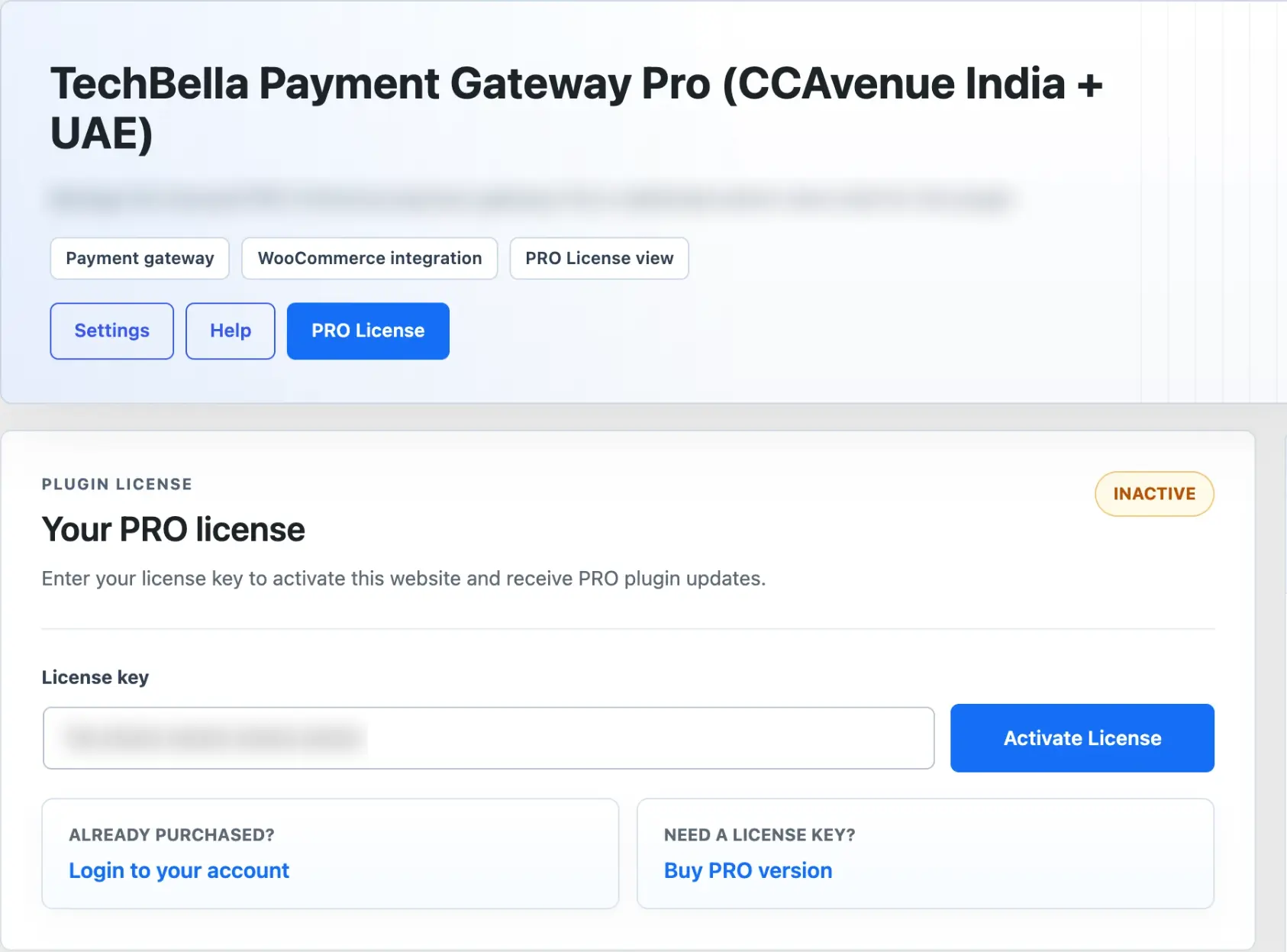
License in WordPress
Activate, check or deactivate your license and see your plan, site allowance and expiry date.
India Region
Accept payments through CCAvenue India with the free or the Pro plugin.
Your Own CCAvenue Account
Connect with your Merchant ID, Access Code and Working Key.
Redirect & iFrame Checkout
Pick the payment flow that fits your store.
Sandbox Mode
Test the whole payment flow before you go live.
Automatic Order Sync
Payment responses update the WooCommerce order status.
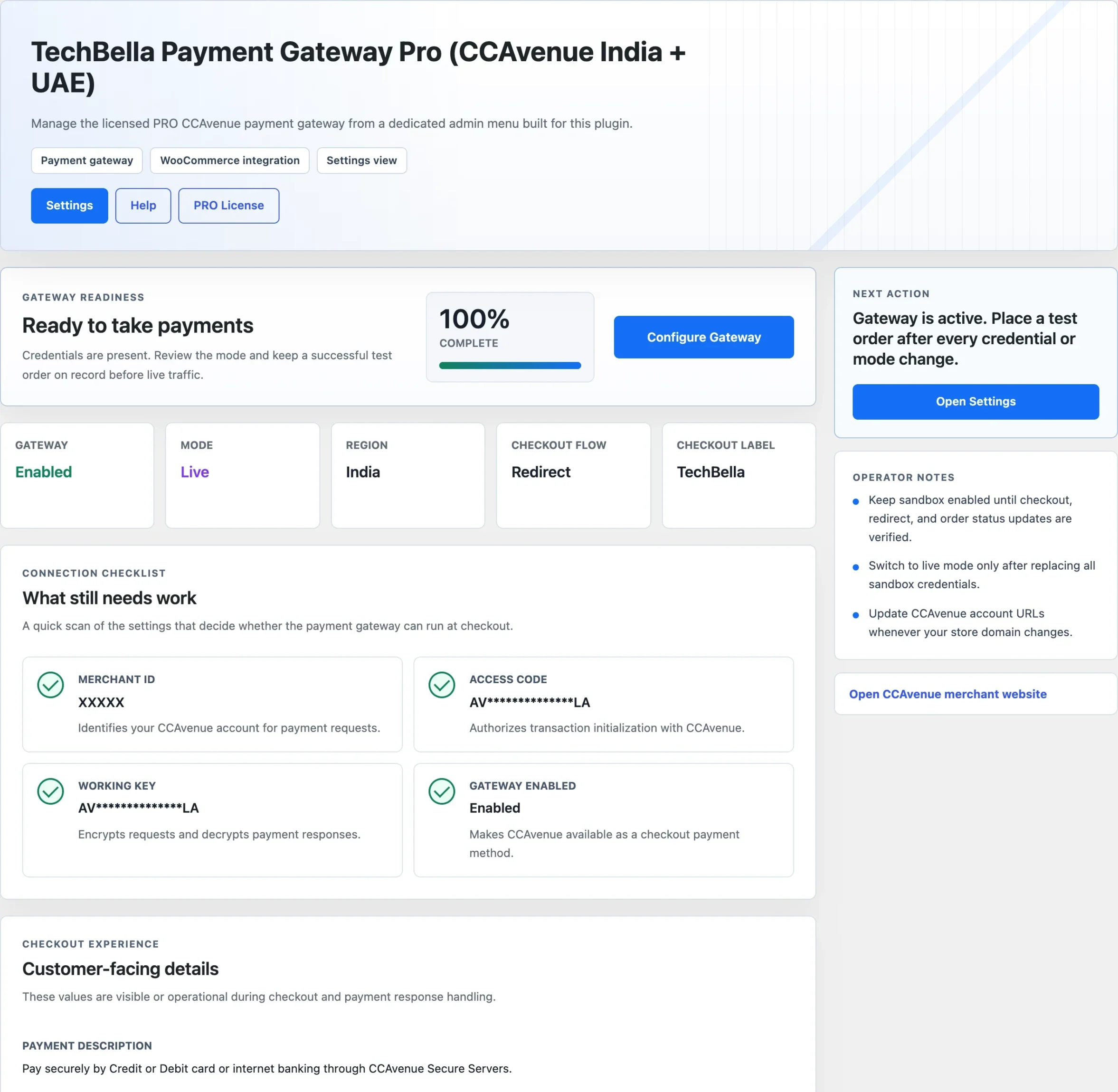
Setup Dashboard
A readiness check shows your credentials, mode, region and checkout flow.
Debug Logging
Turn on detailed logs in one click to fix payment issues.
HPOS Compatible
Built for WooCommerce High-Performance Order Storage.
Demo
See the Plugin Inside Your WooCommerce Store
Know Where Your Setup Stands
A readiness dashboard checks your Merchant ID, Access Code and Working Key and shows your mode, region and checkout flow.
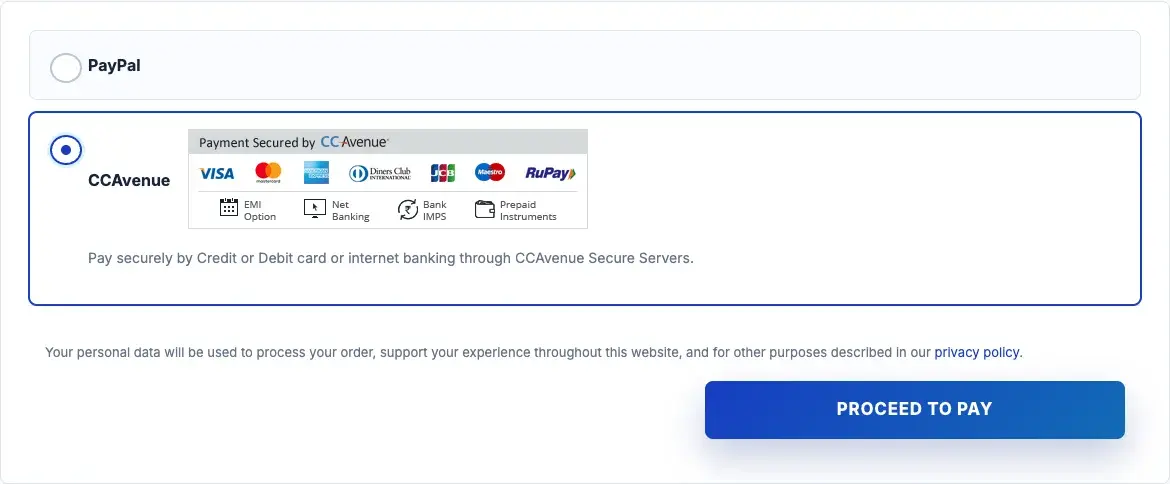
A Checkout Customers Recognize
CCAvenue appears next to your other payment options at checkout.
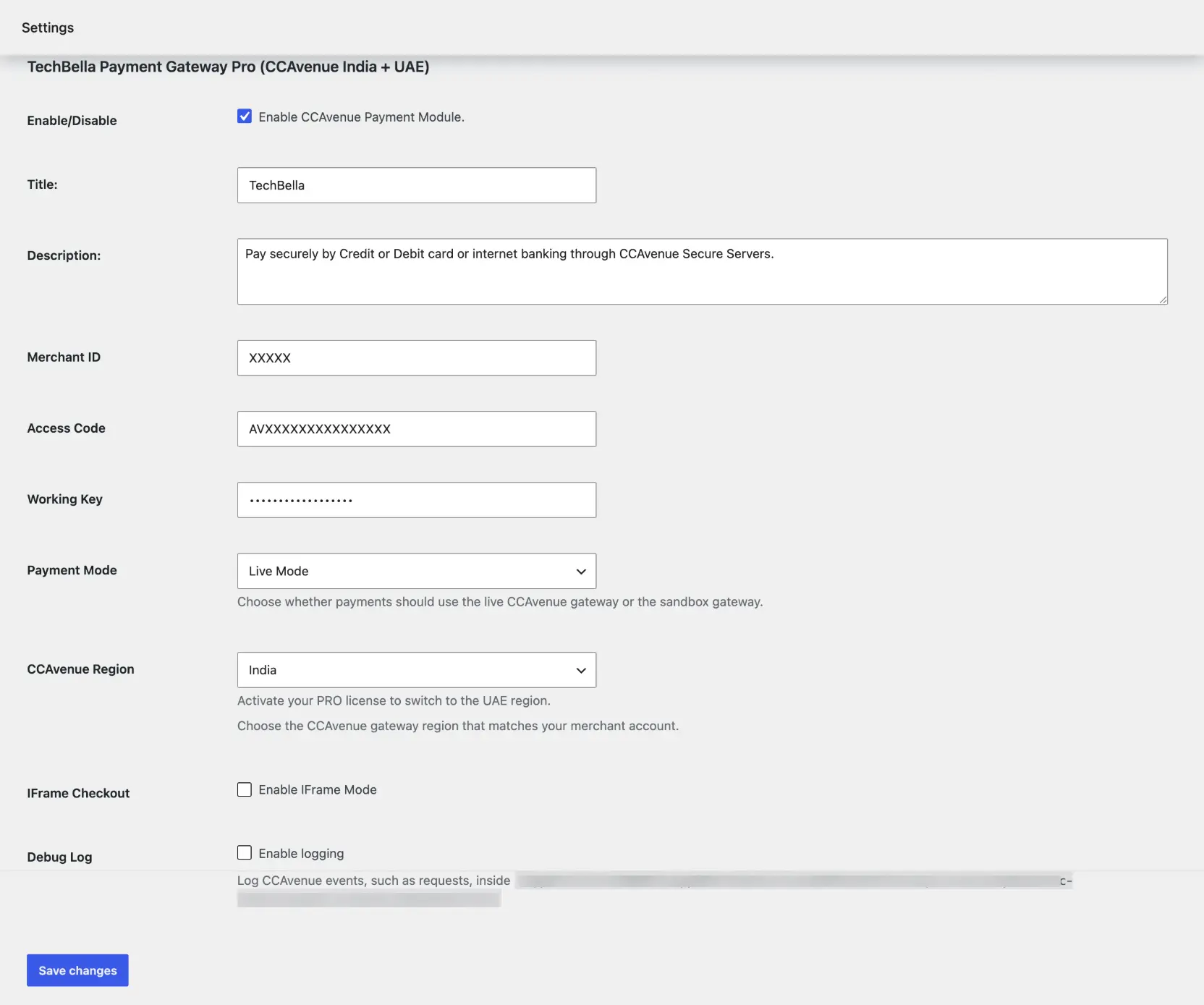
One Settings Screen
Set your credentials, Live or Sandbox mode, region, iFrame checkout and debug logging in the WooCommerce payment settings.
Manage Your License in WordPress
Activate, check or deactivate your Pro license and see your plan, site allowance and expiry date.
Comparison
Free vs Pro: CCAvenue Payment Gateway Plugin
Pricing
Choose Your Plan
Pick the number of sites and the billing period. Every paid plan includes the same Pro features. More features will be added in future updates at no extra cost for active licenses.
Personal
LifetimeBest for single store
- Use on 1 site
- India and UAE regions
- WooCommerce Blocks checkout
- Redirect and iFrame checkout
- Plugin updates while your license is active
Personal
AnnualBest for single store
- Use on 1 site
- India and UAE regions
- WooCommerce Blocks checkout
- Redirect and iFrame checkout
- Plugin updates while your license is active
Plus
LifetimeBest for freelancers
- Use on 3 sites
- India and UAE regions
- WooCommerce Blocks checkout
- Redirect and iFrame checkout
- Plugin updates while your license is active
Plus
AnnualBest for freelancers
- Use on 3 sites
- India and UAE regions
- WooCommerce Blocks checkout
- Redirect and iFrame checkout
- Plugin updates while your license is active
Agency
LifetimeBest for agencies
- Use on 10 sites
- India and UAE regions
- WooCommerce Blocks checkout
- Redirect and iFrame checkout
- Plugin updates while your license is active
Agency
AnnualBest for agencies
- Use on 10 sites
- India and UAE regions
- WooCommerce Blocks checkout
- Redirect and iFrame checkout
- Plugin updates while your license is active
We offer 7 days Money Back Guarantee based on Refund Policy.
Customer Feedback
What Our Customers Say
“Setup was smooth and it works seamlessly with checkout. Supports cards, UPI, net banking & wallets, with secure transactions and automatic order updates. Support team is responsive too. Highly recommended!”
Got Questions?
Frequently Asked Questions
Yes. Activate a Pro license, choose the UAE region and connect your own CCAvenue UAE merchant account.
Your own CCAvenue merchant account with its Merchant ID, Access Code and Working Key. The plugin cannot create or approve an account, so confirm with CCAvenue that your business is eligible before you buy.
The free plugin covers the India region with the classic checkout. Pro adds the UAE region, the WooCommerce Blocks checkout and updates for new WooCommerce releases.
Yes, in Pro. The free plugin works with the classic checkout.
The UAE region stops being available. The India region keeps working.
Yes. Turn on sandbox mode in the gateway settings. For the UAE region, use the test mode of your CCAvenue UAE account.
Yes. Activate a Pro license, choose the UAE region and connect your own CCAvenue UAE merchant account.
Yes. WooCommerce must be active, otherwise the plugin deactivates itself.
No. It is an independent plugin by TechBella Solutions and is not affiliated with CCAvenue.
Get Started
Accept CCAvenue Payments in Dubai, the UAE and India
Connect your WooCommerce checkout to your own CCAvenue merchant account, test it in sandbox mode and go live when you are ready.
Need Help Deciding?
Questions about subscriptions or your license?
Our team can help with setup, licensing or a custom quote before you buy. Contact us and we will help you choose the right plan.
Independent third-party plugin developed by TechBella. Not affiliated with, endorsed by, or officially associated with CCAvenue. "CCAvenue" is a registered trademark of its respective owner.