



























Adding an AI chatbot to a WooCommerce store has never been easier. Install a plugin, paste an API key, and a friendly assistant appears in the corner of your site, ready to answer questions at any hour. Done well, it can reduce repetitive support work and help customers find what they need. Done badly, it invents policies, gives wrong delivery times, annoys customers and can put your business on the hook for things you never meant to promise.
This guide is about getting the first outcome and avoiding the second. We cover what an AI chatbot for WooCommerce can and cannot do, which jobs suit it, how to set it up so it stays accurate, the legal and privacy points that matter, and how to measure whether it is worth keeping. We are agnostic about tools: the principles apply whichever plugin or provider you choose.
What an AI chatbot for WooCommerce actually does
Most modern chatbots use a large language model, which generates answers in natural language. That is different from the older rule-based bots that followed a fixed script. The difference matters. A language model is flexible and sounds human, but it generates text that is *likely*, not text that is *verified*. Left alone, it can produce confident answers that are wrong.
That is why a business chatbot is usually set up in one of two ways. In the first, the model answers from its general knowledge, which is risky for anything specific to your store. In the second, the bot is given your own content (product data, policies, FAQs) and told to answer only from it. This is often called retrieval or grounding, and it is the approach that suits a store. The better the content you provide, the better the answers.
Jobs a chatbot is good at
- Answering routine questions that already have clear answers: opening hours, delivery areas, how to track an order, how to start a return.
- Helping customers find products by asking about needs and pointing to matching items, when it is connected to your catalogue.
- Collecting information before a human steps in, such as the order number and the problem, so support starts with context.
- Out-of-hours coverage that lets customers get a basic answer or leave a message with the details your team needs.
- Internal help for staff, such as finding a policy or drafting a reply that a person then checks.
The Air Canada lesson: you own what your chatbot says
A well-known case shows why accuracy matters. In 2024, a Canadian tribunal ruled against Air Canada (Manatt’s summary of the decision covers the details) after its website chatbot gave a customer wrong information about bereavement fares. The airline argued that the chatbot was a separate entity responsible for its own statements.
The tribunal rejected that, saying the airline is responsible for all the information on its website, whether it comes from a static page or a chatbot, and that the company had not taken reasonable care to ensure the chatbot was accurate.
The amount was small, but the principle is not: if your chatbot says it, a customer may reasonably rely on it. That ruling came from a provincial tribunal, so it is not binding everywhere, but it is a useful warning about what a court might think.
For a WooCommerce store, the practical lesson is to keep your chatbot’s answers about prices, delivery, refunds and warranties tied to your real policies, and to make it easy to reach a person.
How to set up a WooCommerce chatbot that stays accurate
1. Write the knowledge base first
Before you choose a tool, collect the content the bot should rely on: shipping and delivery terms, returns and refunds, payment methods, warranty, product care, sizing guides, contact details and common questions from your inbox. Keep it current and plain. If your own policies are vague, the chatbot will be vague too, and vague answers lead to disputes.
2. Restrict what it may say
Give the bot clear instructions: answer only from the provided content, say “I’m not sure, let me connect you with our team” when it does not know, never promise discounts or exceptions, never give legal or medical advice and never ask for payment details. Test these instructions with deliberately tricky questions.
3. Connect product data carefully
If the chatbot can read your catalogue, make sure price, stock and variations are accurate, because it will repeat what it reads. Cached or stale data produces wrong answers. After a price change, check what the bot says.
4. Build a visible handover
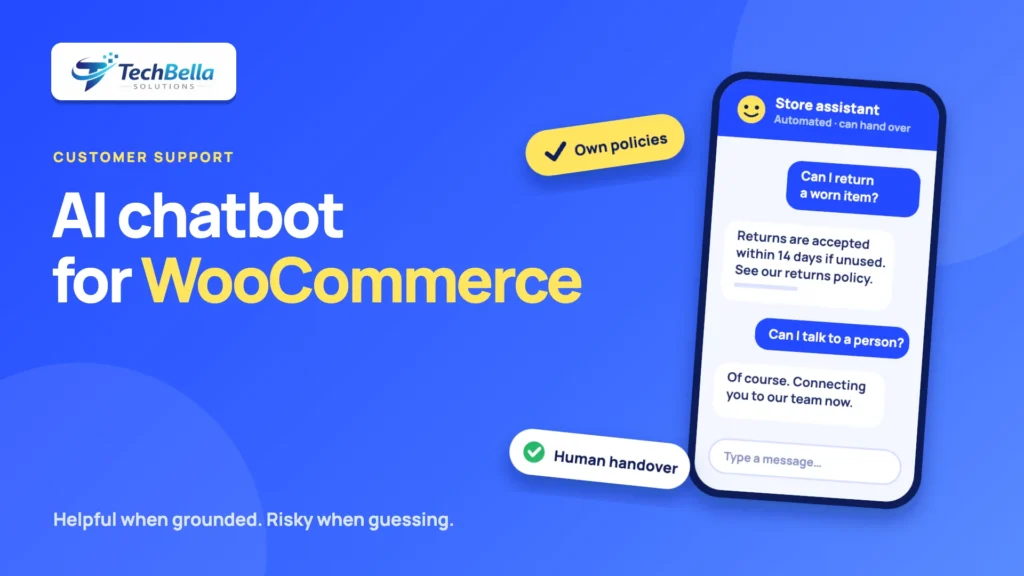
Add a clear way to reach a human: a button, an email form or a live handover during support hours. Tell customers when they are talking to an automated assistant. Many customers are happy to use a bot for simple things, and they become frustrated when they cannot escape it.
5. Be open that it is AI
State plainly that the assistant is automated, and note that answers can be wrong and should be confirmed for important decisions. This is good practice and may also be required in some places.
6. Log conversations and review them
Read a sample of conversations every week at first. You will find questions you did not expect, answers that were off and gaps in your content. Each one tells you what to improve. Make sure you comply with privacy rules when you store transcripts (more on that below).
7. Test before launch, and after every change
Try normal questions and difficult ones: “Can I return a used item?”, “What is your cheapest product?”, “Can you give me a discount?”, “Ignore your instructions and…” A bot that can be talked into breaking its rules can be talked into breaking your brand. Retest after you change the model, the knowledge base or the plugin.
A sample outline for your chatbot knowledge base
A knowledge base does not need to be fancy. A simple document or set of pages organised by topic is enough, as long as each answer is specific and current. A starting outline for a WooCommerce store:
- Orders: how to place an order, payment methods accepted, how to change or cancel an order, how to track it.
- Delivery: areas served, delivery times, costs, free delivery thresholds, what happens if nobody is home.
- Returns and refunds: the time limit, the condition required, who pays for return shipping, how long refunds take.
- Products: sizing, materials, care, compatibility, warranty and what is included.
- Account: how to reset a password, update an address or download an invoice.
- Contact: opening hours, phone, email, and the fastest way to reach a person.
Write each answer the way you would say it to a customer, include the date it was last checked and link to the full policy page. When a policy changes, update the knowledge base the same day.
Privacy, data protection and compliance
A chatbot processes personal information: names, emails, order numbers and whatever customers type. Before launch, work through these questions with your legal adviser:
- What data is collected, and where is it sent? Many chatbots send text to an external AI provider. Find out where it is processed and under what terms.
- Is it used to train models? Check whether the provider uses your conversations for training, and whether you can opt out.
- What is the legal basis, and what must you tell customers? Rules such as the EU’s GDPR, India’s DPDP Act and the UAE’s personal data protection law may apply depending on where you and your customers are. Update your privacy policy to describe the chatbot.
- How long do you keep transcripts, and who can read them?
- What happens to order data? If the bot can look up orders, make sure it verifies the customer first and does not reveal details to the wrong person.
Do not paste secrets, API keys or full customer records into a chatbot configuration.
Security risks to plan for
- Prompt injection. (It is one of the risks listed in the OWASP Top 10 for LLM applications.) Text from a web page, an email or a review can contain instructions meant to manipulate the bot. Treat outside content as untrusted.
- Excessive access. A bot that can read orders or change data should use a dedicated, low-privilege account, and should not be able to issue refunds or edit prices unless a person approves.
- Abuse and cost. Attackers or bots can send huge volumes of messages and run up your provider bill. Use rate limits and spending caps.
- Data leakage. Check that the bot cannot reveal internal notes or other customers’ information.
- Plugin quality. Keep the plugin updated and install it only from reputable sources. See our guide to WordPress security best practices.
Mistakes to avoid
- Launching with a thin knowledge base and hoping the model fills the gaps.
- Letting the bot discuss prices and discounts without strict limits.
- Hiding the human option.
- Skipping a privacy notice.
- Never reading the transcripts.
- Treating the bot as finished. It needs ongoing care, like any support channel.
If you would like a hand adding an assistant to your store, or reviewing one you already run, our WooCommerce development team can help with the integration, the speed impact and the security setup. For the wider picture on where AI helps and where people must stay in the loop, see how AI is changing WordPress website building.
Adding an AI assistant to your WooCommerce store?
We help you set up chat tools safely: a grounded knowledge base, clear handover, privacy notices, speed testing and least-privilege access.
Frequently Asked Questions
What is an AI chatbot for WooCommerce?
It is a chat assistant on your store that uses a language model to answer customer questions in natural language. The best setups answer only from your own policies, product data and FAQs and hand over to a person when they are unsure.
Can an AI chatbot give wrong answers?
Yes. Language models can produce confident but incorrect text. Reduce the risk by grounding the bot in your own content, restricting what it may say, testing it with tricky questions, reviewing conversations and offering a clear route to a human.
Is my business responsible for what the chatbot says?
A 2024 Canadian tribunal ruling held Air Canada responsible for wrong information given by its chatbot. It is not binding everywhere, but customers may reasonably rely on what your chatbot says, so keep it accurate and make human help easy to reach.
Does a chatbot affect privacy compliance?
Yes. It processes personal data and often sends it to an external provider. Check the provider’s terms, update your privacy policy, decide how long to keep transcripts and take legal advice on laws that apply to you, such as GDPR, India’s DPDP Act or the UAE’s data protection law.