



























Node.js sits behind a large share of modern web projects, even when your customers never see it. It runs build tools, React and Next.js apps, API servers, headless storefronts and the pipelines that deploy them. That makes the Node.js LTS version you run a security and maintenance decision, not just a developer preference.
This week the schedule matters more than usual. Node.js 24 has just moved out of active support, Node.js 26 is due to become the new Node.js LTS release on 28 October 2026, and the project has announced a new yearly cadence starting with Node.js 27. This guide explains which Node.js LTS version to run, which to leave, and how to upgrade safely. All dates come from the project’s official schedule, and you should confirm them before planning.
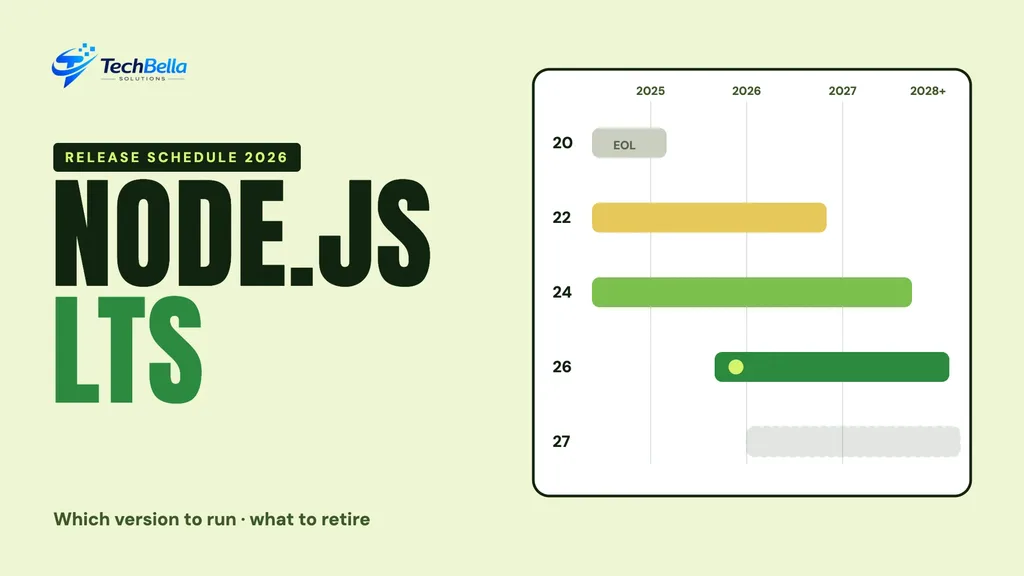
| Node.js line | Status on 24 Oct 2026 | Security support ends |
|---|---|---|
| Node.js 20 | End of life | 30 Apr 2026 (ended) |
| Node.js 22 (Jod) | Maintenance LTS | 30 Apr 2027 |
| Node.js 24 (Krypton) | Maintenance LTS | 30 Apr 2028 |
| Node.js 26 | Current, LTS from 28 Oct 2026 | 30 Apr 2029 |
| Node.js 27 | Alpha starts Oct 2026; LTS Oct 2027 | 30 Apr 2030 |
Which Node.js LTS version should you run?
The Node.js project says only Active LTS or Maintenance LTS releases should be used in production. As of 24 October 2026, that points to two lines for most teams:
- Node.js 24 (“Krypton”) is the safe default today. It entered LTS on 28 October 2025, moved to Maintenance LTS on 20 October 2026 and has security support until 30 April 2028.
- Node.js 22 (“Jod”) is in Maintenance LTS with security support until 30 April 2027. It is fine for now, but plan its replacement early next year.
- Node.js 26 is still a Current release. It is scheduled to enter LTS on 28 October 2026, with security support until 30 April 2029. Test on it now, and move production once your dependencies are confirmed to work.
- Node.js 20 (“Iron”) reached end of life on 30 April 2026. If anything still runs on it, treat that as the first job.
The release schedule at a glance
The dates in the table above come from the project’s schedule.json in the official Release repository, which the project calls the authoritative record. The schedule is not final and may be amended, so check it again before you plan a deadline.
Why 28 October matters
Under the current model, even-numbered releases spend six months as Current, then become LTS. Node.js 26 was released on 5 May 2026, so it reaches LTS at the end of this month. Most teams wait for LTS before moving production, because that is when the project commits to long-term fixes and when libraries and hosts usually confirm support.
Waiting does not mean ignoring it. Add Node.js 26 to your test pipeline now, so surprises show up in a pull request and not on launch day.
What changes with Node.js 27
According to the project’s announcement on evolving the release schedule, Node.js 26 is the last release line under the old model. From Node.js 27:
- There is one major release a year, in April, and LTS promotion in October.
- There is no more odd and even split. Every release becomes LTS.
- A new Alpha channel replaces the role of odd-numbered releases. The project says Alpha is not intended for production use.
- Version numbers align with the year: 27.0.0 in 2027 and 28.0.0 in 2028.
The practical result is simpler: you pick the latest LTS and stay inside a clear window. Total support is described as 36 months from the first Current release.
Understanding Current, Active LTS and Maintenance LTS
The three labels in the Node.js release schedule confuse many non-developers, so here is the plain version. A Current release is new and receives the latest features. It is meant for testing, library authors and early adopters, and it has the shortest life.
An Active LTS release has been promoted for long-term support. It gets bug fixes and security updates, and this is the stage where the project says production use is appropriate. Later it moves to Maintenance LTS, where only critical fixes and security updates arrive until the end-of-life date.
For a business site, the practical rule is short. Run an LTS line, know its end date and move before that date, not after. If you remember only one thing from the table above, make it the support end date of the version your server or build pipeline uses.
How to upgrade Node.js safely
Step 1: Find every place Node runs
Check more than your laptop. Look at your hosting settings, CI pipelines, Docker images, .nvmrc or .node-version files and the engines field in package.json. Different places often run different versions.
Step 2: Check your dependencies
Run npm outdated and read the release notes of frameworks and build tools you depend on. Native modules are the most common source of problems, because they must be rebuilt for each Node.js major version.
Step 3: Test in CI on more than one version
Add the new version to a test matrix next to your current one. Run your full test suite and a production build, and compare results. A failing test on the new version is information, not a crisis.
Step 4: Upgrade staging, then production
Deploy to a staging environment first, run your checkout and login flows and watch logs and performance. Then move production during a quiet period with a rollback plan.
Step 5: Pin the version
Set the version explicitly in every environment so a later image or host change does not move you by accident, and add a calendar reminder for the security support date of the version you chose.
Common problems when you upgrade Node.js
Upgrades are usually uneventful, but a few issues come up often enough to plan for:
- Native modules. Packages that compile code during install must be rebuilt for the new Node.js major version. A failing install after the upgrade is the classic symptom.
- Removed or changed APIs. Each major release can remove behaviour that was deprecated earlier. Read the release notes and run your test suite before upgrading production.
- Lockfiles and cached builds. Old caches in CI can hide problems, so clear them once for the first run on the new version.
- Docker base images. A tag such as
node:ltscan move on its own. Prefer an explicit version so that a rebuild next month does not surprise you. - Hosting limits. Some hosts offer only a few Node.js versions. Check the supported list before you plan the date.
None of these is a reason to stay put. They are reasons to upgrade on a calm day with a rollback ready, which is exactly why the 5-step list above exists.
What this means for stores and business sites
Many WordPress and WooCommerce sites do not run Node on the server, but their themes and block editor assets are built with it. Headless storefronts, React and Next.js apps and Shopify custom storefront work usually do depend on it at build time or runtime. If your agency built something like that, ask which Node.js version it uses and when it will be upgraded.
Remember that Node.js is only one layer. PHP, your database and your plugins have their own support dates, as the October 2026 PHP vulnerability showed. A short yearly review of every layer is cheaper than an emergency upgrade.
A short upgrade checklist
- List every environment and the Node.js version it uses.
- Move anything on Node.js 20 first.
- Plan Node.js 22 to 24 or 26 before April 2027.
- Add Node.js 26 to your CI matrix now.
- Pin versions and record the support end date.
- Keep a rollback plan for each deployment.
Our React and website maintenance teams can audit your versions and handle the upgrade for you.
How often should you review your Node.js version?
For most teams, a twice-yearly review is enough. Check the official schedule in spring and in autumn, note any version that will reach end of life within the next twelve months, and put the upgrade in the plan before it becomes urgent. Under the new yearly cadence starting with Node.js 27, the autumn check lines up neatly with LTS promotion in October.
Write the result in a short note: which environments run which version, the support end date, and the person responsible. It takes ten minutes and saves the stress of discovering an unsupported runtime during a security alert. If you would like a second pair of eyes, the same note is what we ask for when we audit a project.
A worked example: moving a headless store from Node.js 20 to 24
Imagine a small agency that built a React storefront in 2024. It runs on Node.js 20 in production, the build server uses a different patch version, and a developer’s laptop has Node.js 22 installed. This mix is more common than people admit.
The sensible order is to pick one target, here Node.js 24, since it is the safe default in the schedule above. The team adds the target to the CI matrix first and finds that one image-processing dependency needs a newer release. They update it, run the test suite, deploy to staging, click through product, cart and checkout, and then move production on a quiet weekday morning with the previous image ready for rollback.
Finally they pin the version in .nvmrc and in the container file, and add a calendar note for 30 April 2028, when Node.js 24 security support is scheduled to end. The whole job is small because it was planned. Left until after the end-of-life date, the same work becomes an emergency.
Not sure which Node.js version your project runs?
We can audit your versions across hosting, CI and builds, test an upgrade on staging and keep your site on a supported release.
Frequently Asked Questions
Which Node.js LTS version should I use in production?
As of 24 October 2026, Node.js 24 is the safe default and Node.js 22 is acceptable until its security support ends on 30 April 2027. Node.js 26 is scheduled to become LTS on 28 October 2026.
Is Node.js 20 still supported?
No. Node.js 20 reached end of life on 30 April 2026 per the official schedule, so it no longer receives security fixes from the project.
What changes in Node.js 27?
The project moves to one major release a year, with every release becoming LTS and a new Alpha channel for early testing. Node.js 27 is planned for April 2027 and LTS in October 2027, though the schedule may change.