




























Each Pro attachment has its own access rules. The plugin checks them again on every download request, and a visitor who does not qualify gets no working link.
Who can access it
Open the attachment in Attachment Library and choose one option in Who can access it:
- Public (everyone).
- Logged-in users.
- Selected user roles. Tick the roles that may download.
- Customers who bought the product. The customer must be logged in and have an order for the product with a qualifying status.
- Customers whose order reached selected statuses. Pick the statuses, for example Completed.
Dates and limits
- Available from and Expires after. Both use the site time zone.
- Max downloads per customer. 0 means unlimited. The limit counts per logged-in customer, or per order for guest orders.
- Revoke all existing download links stops the links already issued right away.
All rules must pass together: the date window, the access option and the download limit.
Global access settings
Go to EaseAttach Woo, Settings and the Access rules tab.
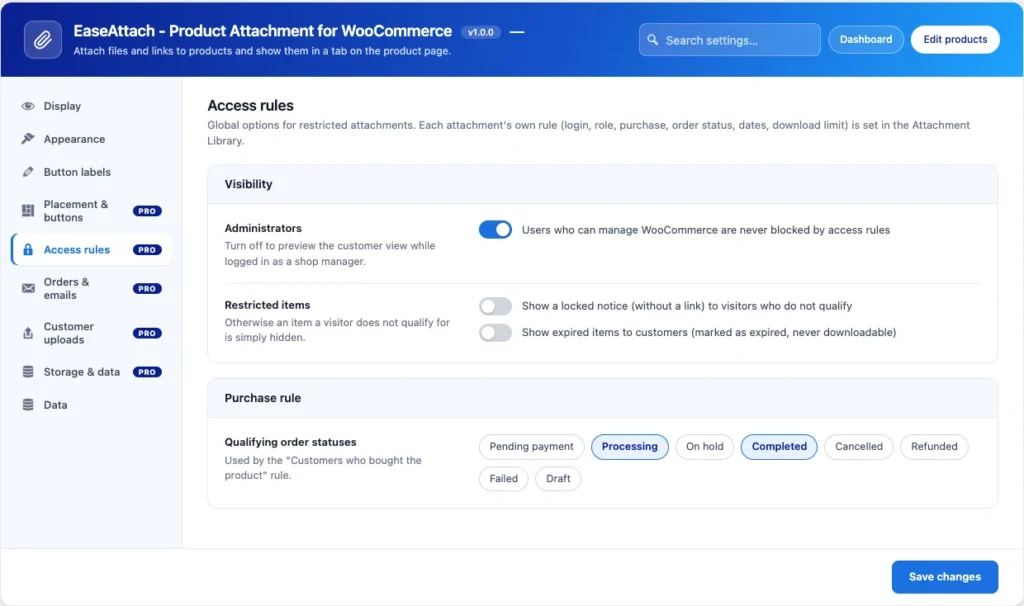
- Administrators. Users who can manage WooCommerce are never blocked. Turn this off to preview the customer view as a shop manager.
- Restricted items. Show a locked notice without a link to visitors who do not qualify, or hide the item.
- Expired items. Show them marked as expired, or hide them.
- Qualifying order statuses. The statuses that count as a purchase. The default is Processing and Completed.
Limits to know
Download limits apply to downloads through the plugin link. A public Media Library address is not limited, so use a Protected file for files that must stay private.